AIPickr
Short answer: Midjourney Standard is the best AI image generator for creators who make images every week. If you already pay for ChatGPT Plus or Google AI Pro, try their built-in image tools first. You may not need another subscription.
Image generators have split into two camps. Dedicated tools like Midjourney and Ideogram give you more control. Assistants like ChatGPT and Gemini are good enough for many social posts and are already in your bill.
Who should use which
- Midjourney if images are a core part of your content and you want unlimited Relax-mode generations.
- ChatGPT if you already pay for Plus and need quick graphics, mockups and edits by chat.
- Ideogram if your images need text: thumbnails, posters, event graphics.
- Gemini if you use Google Workspace and want images bundled with storage.
- Adobe Firefly if you already live in Photoshop or Illustrator.
| Feature | MidjourneyRecommended | ChatGPT | Ideogram | Gemini | Firefly |
|---|---|---|---|---|---|
| Entry paid price | $10/mo | $20/mo (Plus) | $15–20/mo | $19.99/mo (Pro) | $9.99/mo (Standard) |
| Free plan | Weekly credits | Daily generations | |||
| Unlimited slow/relax images | Standard+ | Not listed | |||
| Commercial use | Not listed | Firefly models | |||
| Video generation | Not listed | ||||
| API access | Not listed |
Pricing compared
Prices below come from each vendor’s official page. Last checked: 2026-11.
| Tool | Cheapest paid plan | Yearly option |
|---|---|---|
| Midjourney | Basic $10/mo | $96/yr ($8/mo) |
| Midjourney | Standard $30/mo | $288/yr ($24/mo) |
| Ideogram | Plus $20/mo | $180/yr ($15/mo) |
| ChatGPT | Plus $20/mo | None |
| Google AI | Pro $19.99/mo | $199.99/yr |
| Adobe Firefly | Standard $9.99/mo | Not listed |
The key Midjourney detail is Relax mode. Basic only gets about 200 minutes of Fast GPU time a month, while Standard adds unlimited Relax-mode images. For weekly creators, Standard is the real starting point.
Midjourney: best overall
Midjourney is the pick for anyone who treats images as part of their brand. It offers four plans, and every one allows commercial use, with one condition: companies earning more than $1M a year need Pro or Mega.
Standard ($30, or $24 a month yearly) gets you 15 hours of Fast time and unlimited Relax images. It also unlocks HD video, which helps if you make short clips too.
The biggest catch is privacy. Images are visible to others unless you pay for Pro or Mega, which include Stealth Mode.
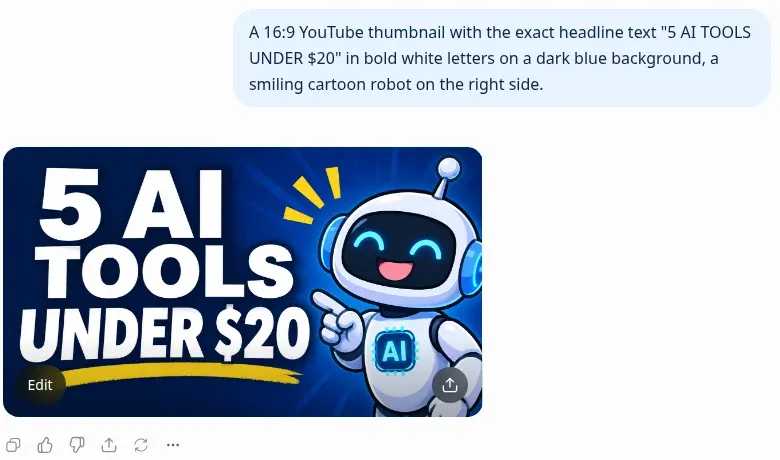

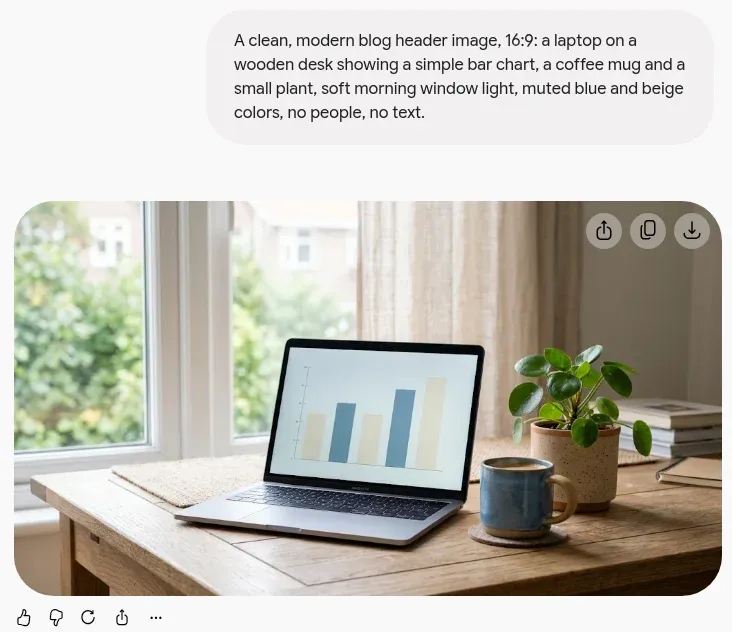
In our test, Gemini produced a usable blog header from our standard prompt on the first attempt, with no people or stray text in the image. On the thumbnail prompt, ChatGPT and Gemini both spelled “5 AI TOOLS UNDER $20” exactly on the first try, but Gemini also added a “TOP PICKS! 2024” label we hadn’t asked for. ChatGPT: Tested on the Free plan; paid plans may perform differently.
ChatGPT: best if you already pay for it
If you have ChatGPT Plus, you already have a capable image tool. You can describe a change (“make the background navy, move the logo left”) instead of rewriting a prompt.
That makes it fast for social posts, simple diagrams and product mockups. Writing and images in the same chat also helps when you’re building a blog post; see our AI writing tools for bloggers guide.
OpenAI’s plan page doesn’t give an image count for Plus. If you make images in bulk, test your real weekly volume before you drop a dedicated tool.
Ideogram: best for text in images
Ideogram is the tool to try when your image needs words in it. That covers YouTube thumbnails, event posters and ad creatives. Ideogram says its models are built for accurate text rendering, and its text-rendering page says the feature is available on all plans and through the API. Those are Ideogram’s own claims.
Plus costs $20 a month or $15 a month yearly. It includes 2,400 priority credits, unlimited slow credits and private generation. Last checked: 2026-11.
Ideogram’s FAQ says you can use generated images commercially. Free accounts publish images to the community by default, so upgrade before you make client work.
Gemini: best for Google users
Gemini can generate and edit images even on the free plan. On Google AI Pro ($19.99 a month) you also get Google Flow credits for video and images, plus 5 TB of storage.
This makes Gemini the value pick for anyone already paying Google for storage. Our ChatGPT vs Claude vs Gemini comparison explains the rest of the plan.
Limits are described as “higher” or “four times” other plans rather than exact counts. Expect to learn your ceiling by using it.
Adobe Firefly: best for Adobe users
Firefly makes the most sense if you already pay for Creative Cloud. Results move straight into Photoshop, Illustrator, Premiere, Lightroom and Adobe Express, and Generative Fill edits photos you already have.
Adobe says everything generated with Firefly models is safe for commercial use. That promise covers Adobe’s own models, so check which model made an image before you use it in client work. Firefly Standard costs $9.99 a month with 2,000 monthly generative credits. Pro costs $19.99 a month with 4,000 credits, and Premium costs $199.99 a month with 50,000 credits. Last checked: 2026-11. Adobe sometimes runs introductory offers, so the price you see may be lower for the first months; plan around the regular price.
Picking by use case
| You make… | Use |
|---|---|
| Blog headers and social images | ChatGPT or Gemini (already paid) |
| A recognizable visual style | Midjourney Standard |
| Thumbnails with text | Ideogram Plus |
| Edits to existing photos | Adobe Firefly (Generative Fill) |
| Clips from your images | Midjourney or a video tool |
Turning images into video? Our best AI video generators for short-form content guide picks up from here.
The tools in detail
1. Midjourney
Our pickPrice: Basic $10/mo; Standard $30/mo; Pro $60/mo; Mega $120/mo (20% off yearly) · Last checked: 2026-11
Pros
- Standard and up include unlimited Relax-mode image generations.
- Commercial use allowed on all plans (companies over $1M revenue need Pro or Mega).
- Also generates video (SD on Basic, HD from Standard).
Cons
- No free plan.
- Images are not private below the Pro plan.
- Basic includes only about 3.3 hours of Fast GPU time per month.
- Best for
- Creators and marketers who generate images weekly and care about style.
- Skip it if
- Anyone who needs private images on a budget — Stealth Mode starts at Pro ($60/mo).
2. ChatGPT
Price: Included in Plus ($20/mo); limited on Free · Last checked: 2026-11
Pros
- No extra subscription if you already have Plus.
- Edit images by describing changes in plain English.
- Pairs image work with writing in one chat.
Cons
- OpenAI's plan page gives no image count for Plus.
- Fewer style controls than Midjourney.
- Monthly billing only.
- Best for
- People who already pay for ChatGPT and want quick social graphics, mockups and edits by chat.
- Skip it if
- Artists who want fine control over style and batches.
3. Ideogram
Price: Plus $20/mo or $15/mo yearly; Pro $60/mo or $42/mo yearly; pay-as-you-go 1¢/credit · Last checked: 2026-11
Pros
- Plus includes 2,400 priority credits a month and unlimited slow credits.
- Commercial use allowed per Ideogram's FAQ.
- Pay-as-you-go option and API for developers.
Cons
- No free trial on subscriptions.
- AI editing features need priority credits.
- Unused priority credits expire monthly.
- Best for
- Thumbnails, posters and ads that need readable text inside the image.
- Skip it if
- Users who want private images on the free tier — free images are published by default.
4. Gemini
Price: Free tier; Google AI Pro $19.99/mo · Last checked: 2026-11
Pros
- Image generation and editing available even on the free plan.
- Google AI Pro adds Google Flow credits for video and images.
- Bundled with 5 TB of storage on Pro.
Cons
- Usage limits are described relative to other plans, not as exact counts.
- Model names (Nano Banana etc.) change often.
- Some features are US-only.
- Best for
- Google Workspace users who want image generation bundled with storage and Gemini.
- Skip it if
- Creators who only need images and don't use Google's apps.
5. Adobe Firefly
Price: Free plan with daily generations; Standard $9.99/mo; Pro $19.99/mo; Premium $199.99/mo · Last checked: 2026-11
Pros
- Results move into Photoshop, Illustrator, Premiere, Lightroom and Adobe Express.
- Adobe says everything generated with Firefly models is safe for commercial use.
- Generative Fill and Generative Expand edit existing photos.
Cons
- Paid plans run on a monthly credit allowance, and credit cost varies by feature.
- Best value only if you use Creative Cloud.
- Best for
- Designers already in Photoshop and Illustrator.
- Skip it if
- Casual creators who don't use Adobe apps.
Final verdict
Pay for Midjourney Standard if images are central to your work. Use ChatGPT or Gemini if you already subscribe and only need images now and then.
Choose Ideogram for text-heavy graphics and Firefly if Adobe is already in your toolkit. Check commercial terms before using any AI image for clients.